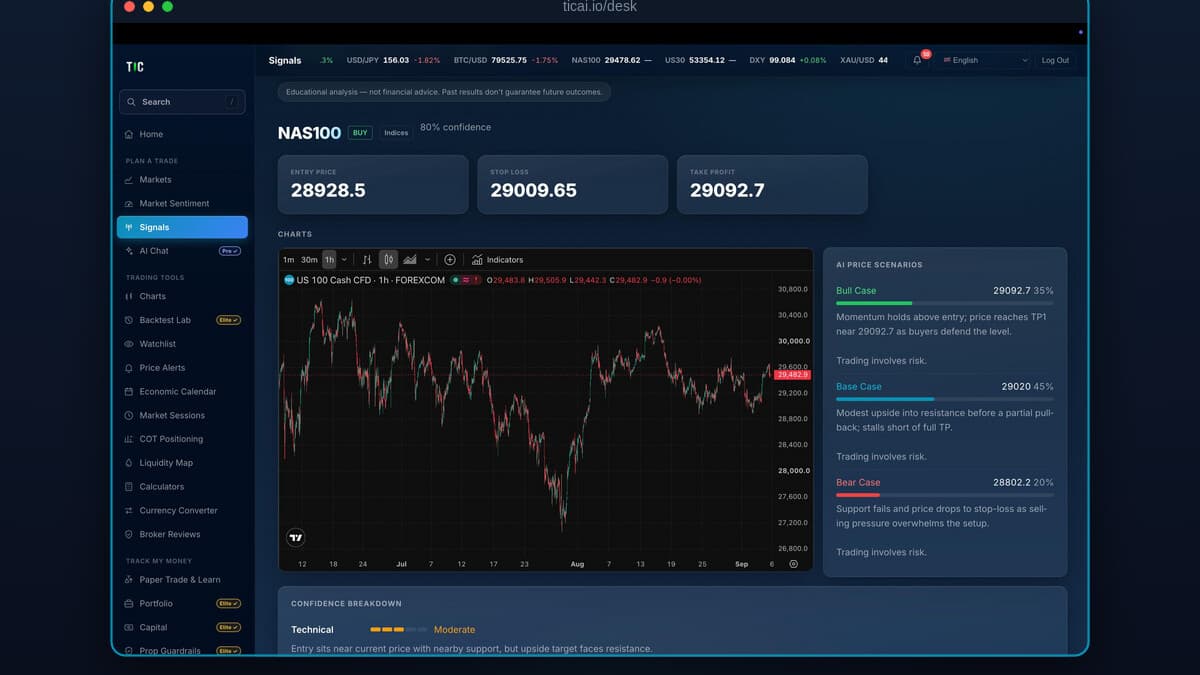
Het draait in elke webbrowser op ticai.io/desk, gebruikt hetzelfde account dat u al op uw telefoon heeft, en alles wat u op het ene scherm doet, verschijnt op het andere. Als de mobiele app is wat u tussen vergaderingen door bekijkt, is TIC Desk waar u gaat zitten om de markt echt te bestuderen.
Wat Is TIC Desk?
TIC Desk is de desktop-, browsergebaseerde versie van de TIC-app. Er valt niets te installeren: u opent ticai.io/desk, logt in met uw bestaande TIC-account, en het volledige werkstation laadt in de browser. Het is gebouwd voor het ene ding dat een telefoon een handelaar niet kan geven, namelijk ruimte. Grafieken, een signaal, de economische kalender en uw dagboek kunnen allemaal tegelijk op het scherm staan in plaats van één tabblad tegelijk.
Het is beschikbaar in 13 talen, inclusief volledig rechts-naar-links Arabisch, zodat het hele werkstation correct leest of u nu in het Engels of Arabisch werkt.
Wat Kunt U Er Eigenlijk Mee Doen?
Het meeste van wat de telefoon-app doet, met meer ruimte om het te doen. De linkerkolom groepeert de tools zoals een handelaar werkt:
- Plan een transactie — live Markten, een Marktsentiment-aflezing, Signalen, en een AI Chat waarmee u over elke setup kunt vragen.
- Handelstools — volledige Grafieken, het Backtest Lab, een Economische Kalender, Marktsessies, een Watchlist, Prijsalerts, Rekenmachines, COT Positionering, een Liquiditeitskaart en een Valutaomrekenaar.
- Volg mijn geld — Paper Trade en Leren, een Portfolio-overzicht, een Kapitaalplan en Prop Guardrails.
- Leer en Compete — de volledige Trading Academy, het Trading Journaal met zijn analyses, de wekelijkse Trading League en de communityfeed.
Het Trading Journaal, de paper-trading-simulator, grafieken, rekenmachines, de economische kalender en de Academy zijn gratis. Signalen en de AI Chat zitten in het Pro-abonnement; het Backtest Lab, Portfolio, Kapitaal en Prop Guardrails zitten in Elite. De Desk toont een klein label op de betaalde tools, zodat u altijd weet wat een functie kost voordat u haar opent in plaats van erna.

Blijft Het Gesynchroniseerd met de Telefoon-app?
Ja, en dat is het hele punt van één account over alle schermen. U logt één keer in, en uw watchlist, dagboekinvoer, Academy-voortgang en beloningen zijn dezelfde gegevens gezien vanaf twee apparaten. Begin een Academy-les te lezen in de trein en maak hem af aan uw bureau; log een transactie op de Desk en hij staat in hetzelfde dagboek op uw telefoon. Er is geen apart desktopaccount, geen export en import, en geen tweede abonnement.
Wat Is Gratis en Wat Vereist Een Abonnement?
Gratis, met alleen een TIC-account: het Trading Journaal en zijn discipline-tracking, de paper-trading-simulator, live grafieken, de economische kalender, rekenmachines, Marktsessies en de Trading Academy.
Pro voegt live Signalen en de AI Chat toe. Elite voegt het Backtest Lab, het Portfolio- en Kapitaalplanningsgereedschap, en Prop Guardrails toe. Het is hetzelfde abonnement als de mobiele app: betalen op één apparaat ontgrendelt de functie op beide.
Voor Wie Is TIC Desk?
Het is voor het deel van trading dat geen orders plaatsen is. Als u de telefoon-app gebruikt om even een signaal of een alert te bekijken, is de Desk waar u gaat zitten om de grafiek goed te lezen, een idee te backtesten voordat u er geld op riskeert, het dagboek van vorige week te herzien, of een Academy-niveau door te werken op een echt toetsenbord.

De eerlijke beperkingen zijn het waard duidelijk te stellen. TIC Desk is een onderzoeks-, dagboek- en leerwerkstation, geen broker: het houdt uw geld niet aan en plaatst geen live transacties namens u bij een brokerage. Het is een verzameling tools en lessen die u helpen uw eigen beslissingen te nemen, en zoals elk gereedschap maakt het op zichzelf niemand winstgevend. Dezelfde redenering is waarom TIC zijn eigen strategieën beoordeelt op een onafhankelijk geverifieerd Myfxbook-trackrecord op /results in plaats van op screenshots.
Als u nieuw bent bij sommige van de tools die het u voorlegt, zijn wat drawdown werkelijk meet en risico en rendement goede startpunten, en met de paper-trading-simulator kunt u dit alles oefenen zonder een cent te riskeren.
handelen brengt een hoog risico met zich mee en u kunt uw kapitaal verliezen; resultaten uit het verleden bieden geen garantie voor de toekomst; uitsluitend educatief, geen beleggingsadvies.
Available on iOS and Android
iOS — App Store
iPhone and iPad — free download
Android — Google Play
All Android devices — free download
Download TIC Free Today
Full academy, paper trading, and four calculators — no credit card required. Upgrade to Pro or Elite when you're ready.
The TIC App subscription is separate from the copy-trading 30% performance fee — they are two independent services.
Verify any trader's results in 10 minutes
Seven checks that reveal whether a track record is real: third-party verification, maximum drawdown, trade count, and the martingale warning signs. Use it on anyone — including on us.
We'll send the checklist plus occasional TIC insights. We never share your email, and you can unsubscribe any time.